Manual.ly Logo

Russell Hobbs Grind and Brew Digital 25610-56 Bruksanvisning

2,0 · 1 Betyg

PDF-manual · 96 Sidor

Svenska

M: QW-35-FL
sida

/ 96

Loading...
a5b281e5a9e94940c86c35e01dc1aa49ca05 page 6
6
KEEP WARM
• Once brewed, the hotplate will keep the coee warm for 40 minutes after brewing. The keep warm mode is indicated by the light around the +
button coming on. After 40 minutes, the light will go out.
USING THE TIMER
Note: Make sure the clock is set to the correct time. Use the hr and min buttons.
1. Prepare the coee maker according to which mode you are using but do not press the + button to start brewing.
2. Press the
Y
button. The button will ash and the
Y
icon will ash on the display.
3. Within 10 seconds of pressing the
Y
button, use the hr and min buttons to enter the time you want your coee maker to start brewing.
4. If a time has previously been programmed, it will ash on the display otherwise the display will show the default setting of 8:00.
5. 10 seconds after you have nished entering the time, the
Y
button will stop ashing and remain lit. The
Y
icon on the display will also stop ashing
and remain lit. Your coee maker is now programmed to brew at the time you have entered.
• If you want to check the program time press the
Y
button. The programmed time will show for 3 seconds and then return to the time of day.
• If you want to cancel the timer before brewing has started, press and hold the
Y
button for 5 seconds until the
Y
light goes out and the
Y
icon
disappears from the display.
• If you want to stop the coee maker while it’s brewing, press the + button.
A QUICK CUP
If you want a quick cup of coee before the brewing cycle has nished:
1. You can remove the carafe at any time. The non-drip valve will prevent coee dripping on to the hotplate.
2. To prevent the lter holder overowing, replace the carafe on the hotplate within about 20 seconds.
3. When you replace the carafe on the hotplate the non-drip valve opens to let any remaining coee through.
CARE AND MAINTENANCE
GENERAL CLEANING
1. Unplug the appliance and let it cool.
2. Tip the contents of the lter holder into the bin.
3. Wipe all surfaces with a clean damp cloth.
4. Hand wash the carafe and lter holder. Wipe out the hopper with kitchen paper.
5. Wipe the shaded area shown in Fig H with a piece of damp kitchen paper. Use the brush if necessary to loosen any coee debris.
Note: If you haven’t used your coee maker for more than 4 weeks, we recommend that you follow the steps under BEFORE USING FOR THE FIRST TIME
before brewing coee again.
CLEANING THE GRINDER
The grinder can be disassembled in order to clean it. If you try to disassemble the grinder without rst removing any surplus coee beans, it will be very
dicult to reassemble correctly. The grinder cannot be cleaned if the coee maker is in keep warm mode. Follow these steps:
1. Twist the coee bean hopper and lid counterclockwise until the d symbol aligns with the usymbol (Fig A).
2. Lift o the hopper, remove the lid and empty out any coee beans. Wipe out the hopper with kitchen paper.
3. Replace the lid then ret the hopper onto the coee maker aligning the d symbol with the usymbol. Twist the hopper clockwise until the d
symbol aligns with the lsymbol (Fig B).
4. Turn the grind control to the ne (l) setting.
5. Press the
g
button to select the 6 cup setting.
6. Press the + button. After a few moments the grinder will start. Once it has stopped, press the + button until the +light goes out.
7. Follow step 1 again to remove the bean hopper.
8. Turn the grind control to the
r
setting (Fig C).
9. Lift up the handle on the grinding head (Fig D).
10. Lift the grinding head out of the body of the appliance (Fig E). If it doesn’t lift out easily, make sure that the 3 marks on the grinding head are aligned
with the b markings (Fig G).
11. Use the cleaning brush to clean the grinding head and the area where it ts into the appliance. Do not use water.
12. Ret the grinding head by aligning the 3 marks on the grinding head with the b markings and pressing it down (Fig G). Fold the handle back down.
13. Turn the grind control to any of the grind settings.
14. Ret the hopper.
SELF CLEAN
After 60 brewing cycles, the display will show CLE and the c icon to indicate that the appliance needs descaling. Descaling ushes out the deposits that
naturally build up over time.
1. Use a proprietary brand of descaler suitable for use in plastic-bodied products. Follow the instructions on the package of descaler.
2. Pour the descaling solution into the water reservoir to the max mark.
3. Press the c button.
4. The automatic self clean process will start and will continue for about 45 minutes.
5. After the process has nished, your coee maker will switch o.
• Products returned under guarantee with faults due to scale will be subject to a repair charge.
CLEANING FREQUENCY
Daily - Remove any used coee grounds and lter papers as required. Clean the lter holder and carafe. Wipe the shaded area shown in Fig H with a piece
of damp kitchen paper. Use the brush if necessary to loosen any coee debris.
Weekly - Clean the grinder.

Chatta med din Russell Hobbs Grind and Brew Digital 25610-56-manual med hjälp av AI

Få omedelbara AI-svar från din Russell Hobbs Grind and Brew Digital 25610-56-manual

Fråga vad som helst om Russell Hobbs Grind and Brew Digital 25610-56. Svaren kommer från denna bruksanvisning, med de sidor de bygger på.

Grind and Brew Digital 25610-56 Underhallsschema

Daglig
Rengör filterhållare och kanna

Ta bort använda kafferester och papper. Rengör filterhållaren och kannan. Torka av det skuggade området i figur H med en fuktig trasa.

Visa i manualen (sida 6)
Veckovis
Rengör kvarnen

Montera isär kvarnen för rengöring. Använd rengöringsborsten på malhjulet och omgivande ytor. Använd inte vatten.

Visa i manualen (sida 6)
Var 60:e bryggcykel
Avkalka apparaten

Använd ett specialavkalkningsmedel som är lämpligt för produkter med plastkropp. Häll lösningen i behållaren och tryck på knappen för självrengöring.

Visa i manualen (sida 6)
M: qwen/qwen3.8-flash

Ställ en Fråga

0/1000

Rekommenderar du Grind and Brew Digital 25610-56?

Ja Nej
0
User Pic

UtMaiores24

för 7 månader sedan

Hur länge håller denna maskin vanligtvis innan bryggslangen lossnar från värmesulan?

0
User Pic

Manual.ly

för 7 månader sedan

Tack för din feedback. Vi är ledsna att höra om problemet med sladdens lossning. Även om många enheter fungerar utan problem rekommenderar vi att du kontrollerar slanganslutningarna årligen för att förebygga läckor. Om du köpte produkten inom garantiperioden, vänligen kontakta vårt supportteam med ditt inköpsbevis för hjälp.

M: QW-35-FL
M: QW-35-FL
0
User Pic

Sara Muller

för 6 månader sedan

Vet någon om det finns ett känt fel som gör att bryggslangen lossnar efter två år?

M: QW-35-FL

Vanliga frågor

A

Tryck på lägesväljaren tills 'g'-ikonen visas för maling av bönor eller 's'-ikonen visas för förmalda kaffebönor.

Är detta svar till hjälp?

A

Denna maskin använder standard #4 konformade pappersfilter, som inte ingår i boxen.

Är detta svar till hjälp?

A

Maskinen indikerar behov av avkalkning efter 60 bryggcykler eller när CLE-koden visas på displayen.

Är detta svar till hjälp?

A

Nej, klockan måste ställas korrekt med tim- och minutknapparna innan timerfunktionen kommer att fungera.

Är detta svar till hjälp?

A

Ja, plattan håller värmen i exakt 40 minuter innan den stängs av för att spara energi.

Är detta svar till hjälp?

M: QW-35-FL

Fördelar och Nackdelar

Fördelar

  • Inbyggd konisk burr-kvarn bevarar bönornas fräschhet
  • Programmerbar timer gör det möjligt att vakna upp till färskt kaffe
  • Dubbla driftslägen stöder både hela bönor och förmalda kaffebönor
VS

Nackdelar

  • Kvarnen kräver manuell demontering för noggrann rengöring
  • Karaffen har inte en isolerad termisk vägg
  • Plastkroppen kan visa tecken på slitage vid utsträckt tung användning
M: QW-35-FL

Produkt Specifikation

Effekt

1000 W

Färg

rostfritt stål, svart

Kapacitet

10 koppar, 250 g bönor

Kvarn

inställbar konisk kvarn

Filter

svängfilter, filterinsats

Funktioner

håll-varm-funktion, aromval, timer, automatisk avstängning, droppskydd

Innehåll i förpackningen

1x glaskanna

M: QW-35-FL

Produkt Beskrivning

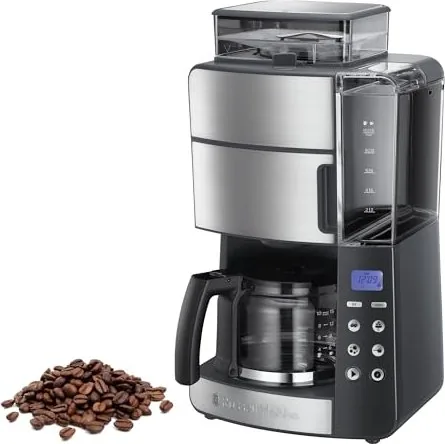
Upplev den perfekta koppen med Russell Hobbs Grind and Brew Digital

Börja dina morgnar med en rik och aromatisk kopp kaffe med Russell Hobbs Grind and Brew Digital. Denna mångsidiga apparat är designad för kaffelovare som uppskattar färska bönor och bekvämlighet. Genom att kombinera en inbyggd kvarn med ett precist bryggningssystem säkerställs att varje bön mal till perfektion precis innan bryggningen påbörjas.

Maskinen har två distinkta driftslägen för att passa alla preferenser. I läget Mal och Brygg fyller du hoppern med färska bönor, väljer din önskade malningsgrad från fin till grov och väljer antalet koppar mellan två och tio. Den digitala displayen guidar dig genom processen och låter dig justera styrkeinställningar för normal, medium eller stark bryggning. Alternativt erbjuder läget Förmalda Kaffebönor flexibilitet för de som föredrar att använda sina egna malda kaffebönor direkt i filterhållaren.

Bekvämlighet står i centrum för denna design. Den programmerbara timerlåten låter dig vakna upp till nybryggt kaffe genom att ställa in starttiden upp till 24 timmar i förväg. När bryggningen är klar håller plattan ditt kaffe varmt i upp till fyrtio minuter. För enkel underhåll inkluderar enheten en självrengöringsfunktion som aktiveras efter sextio cykler för att ta bort kalkavlagringar. Kvarnen kan också demonteras för djuprengöring, vilket säkerställer optimal prestanda över tid. Säkerhetsfunktioner inkluderar automatisk avstängning och en droppfritt ventilerad karaff för att förhindra spill när hälls.

Oavsett om du är en stressig professionell som behöver en snabb morgonboost eller en helg-entusiast som njuter av långsamma morgnar, anpassar sig denna digitala kaffebryggare till din livsstil. Dess kompakta design passar snyggt på diskbänkar och kabelförvaringen håller arbetsytan prydlig. Njut av ritualen att göra kaffe med precision och lätthet.

M: QW-35-FL

© Copyright 2026 Manual.ly